Discord text formatting: markdown vs fancy Unicode fonts
6 min read · 7 sections
Discord text formatting comes in two kinds: markdown, which Discord renders for you inside messages, and fancy Unicode fonts, which are real characters you paste in. They solve different problems, and picking the wrong one is why a nickname shows asterisks or a message shows boxes.
Short version from my own habits: markdown for anything you send in chat, Unicode styles for the few fields that never render markdown, such as a nickname. The font generator handles the second kind: its Discord-style frame previews a nickname on one line and counts it against 32, both by visible characters and by UTF-16 units.
Discord markdown: the syntax
Discord's developer reference describes message rendering as a subset of markdown, plus extras such as mentions and timestamps. Subset is the key word: other markdown dialects have features Discord ignores, and the client changes over time. The table lists the syntax I use; send each line once in a private channel to confirm it on your client before relying on it.
| Effect | You type | Notes |
|---|---|---|
| Italic | *text* or _text_ | One marker on each side |
| Bold | **text** | Two markers |
| Bold italic | ***text*** | Three markers |
| Underline | __text__ | Double underscore, not the same as italic |
| Strikethrough | ~~text~~ | Two tildes |
| Spoiler | ||text|| | Reader clicks to reveal |
| Inline code | `text` | Monospace, markdown inside is not applied |
| Code block | ```text``` | Put the fences on their own lines for several lines |
| Heading | # text | Start of a line; depends on the client version |
| Quote | > text | Start of a line |
| Show the symbol itself | \*text\* | A backslash before the marker cancels it |
Two habits save time. First, combine markers deliberately: __**text**__ gives underlined bold, and the order of the markers should mirror each other. Second, if a word with underscores or asterisks (a username, a file name) turns italic by accident, put a backslash in front or wrap it in inline code.
When fancy Unicode fonts are the right tool
Markdown only works where Discord renders it. A nickname, a display name or a status line stores the characters as typed, so **Quiet Fox** shows up with the asterisks. For those fields the only way to get a styled look is to paste styled characters. They come from the Mathematical Alphanumeric Symbols block (overview), so to the app they are just different letters.
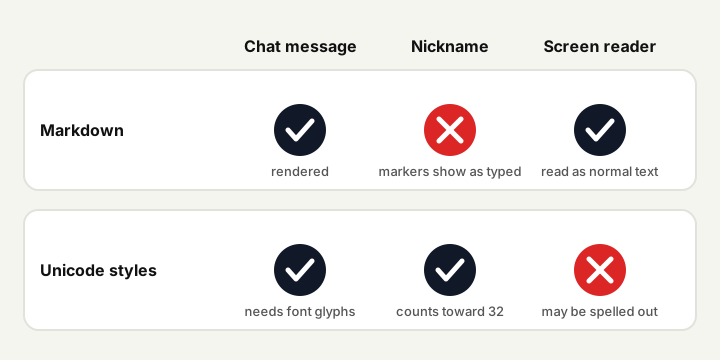
Styled characters also work in messages, and they are tempting there. I would still use markdown in chat: it is easier to edit, anyone can reply by quoting plain text, and screen reader users hear normal words. Keep Unicode for the places where you have no alternative.
Nickname length: 32 is not always 32
Discord's help article on server nicknames lists a nickname of 1 to 32 characters. Styled letters complicate the count. A bold sans-serif letter is two UTF-16 units, so a nickname that looks like 16 letters can measure 32 in the unit JavaScript uses. Whether the client counts code points or UTF-16 is something to test: type the styled name into the nickname box and see where it stops accepting characters.
| Nickname | Visible | UTF-16 units |
|---|---|---|
| Quiet Fox | 9 | 9 |
| 𝗤𝘂𝗶𝗲𝘁 𝗙𝗼𝘅 | 9 | 17 |
A styled nickname of up to about 16 letters is safe under either rule. Longer than that, drop to a plain style or shorten. Also remember that people find you by typing plain letters after an @ mention; a nickname in styled letters can be hard to find that way, so keep your plain username recognisable or add a plain tag at the end. In the generator, a nickname that looks short enough but is over 32 UTF-16 units gets a warning that says how many units too many, and line breaks show as spaces because a nickname is one line.
Markdown versus Unicode styles at a glance
| Question | Markdown | Unicode fonts |
|---|---|---|
| Works in a message | Yes | Yes, if the viewer's font has the glyphs |
| Works in a nickname | No, shows the markers | Yes |
| Counts against a limit | Markers count as characters you type | Each styled letter may count double |
| Read by screen readers | As normal text | May be spelled out or skipped |
| Easy to edit later | Yes, change the markers | Retype or paste again |
| Can show boxes | No | Yes, on phones without the glyphs |
| Styles available | Bold, italic, underline, strike, code, spoiler | 61 in the generator, from script and fraktur to circled and full-width |
How I choose, in five steps
- Is it a chat message? Use markdown.
- Is it a field that shows raw characters (nickname, status)? Use a Unicode style.
- Pick a legible style: bold or italic sans-serif travel best; avoid script and fraktur for names others must read quickly.
- Check the count: switch the generator's bio builder to the Discord-style frame (limit 32), read both counters and test the field once.
- Keep a plain version of the name somewhere: in your bio or the username, so people can still find you.
Mixed text is fine. **Quiet Fox** in a message and a bold sans-serif Quiet Fox as a nickname complement each other. What does not work is putting markdown markers inside a Unicode nickname and expecting both.
Mistakes I see most often
- Styling a whole message with Unicode. It is slower to read, it counts double in length-limited fields and it makes your text invisible to anyone searching for plain words in the channel.
- Forgetting the closing marker. One missing
**or||and the rest of the line stays plain or the spoiler never closes. Re-read before sending. - Using a fancy name for a role-playing character and then wondering why nobody can tag it. If people need to mention you, give the nickname a plain-letter anchor.
- Trusting a style on your own screen only. A friend on an older phone may see boxes where you see script. Ask one person to confirm.
- Copying markdown from another app. Rich text pasted from a document can bring its own formatting; paste as plain text and add the markers yourself.
Decorating with symbols instead
For a plain-looking nickname with some personality, one or two symbols such as a star or a diamond are often a better answer than a full style, because they cost one unit each and need no special font. The generator's symbol palette inserts them at the cursor and crosses out any your device cannot draw. See aesthetic text symbols and dividers that show on every phone for the safe sets. For limits on a different platform, the Instagram bio guide covers the 150-character case.
Questions and answers
How do I make text bold in Discord?
Put two asterisks on each side of the text in a message, for example **text**. This is markdown, so it works in chat but not in a nickname.
Can I use fancy Unicode fonts in a Discord nickname?
Yes, nicknames accept pasted characters. Check the length, because styled letters may count as two units and the nickname limit is 32 characters.
Why does my nickname show asterisks?
Nicknames display the characters as typed, so markdown markers are not applied. Use a Unicode style from the generator instead.
How do I stop Discord from formatting my text?
Put a backslash before the marker, or wrap the text in inline code with backticks. Both show the symbols literally.
Are Unicode fonts accessible on Discord?
Often not. Screen readers may spell out or skip styled letters. Use them for short decorative names and keep the important message in plain text or markdown.